The leoflow lite workflow
leoflow lite runs the whole stack locally — control plane, the embedded Airflow
UI, and a real executor — against an isolated local database, and
hot-reloads on every save. The UI is served on a Lite port (default
8088), marked with the LITE badge, so it never collides with a demo or
production instance.
This page is the from-source loop for working on Leoflow itself:
make dev-install            # build + put leoflow / server / agent on your PATH
leoflow lite provision          # provision local dev deps (base image, local DB)
leoflow init dags/my_dag    # scaffold a project
leoflow lite dags/my_dag    # hot-reload at http://localhost:8088 (marked LITE)
Login
If you ran leoflow setup (the
end-user installer does), Lite enforces a real admin login — recover it
with leoflow lite reset-password. A bare source checkout without that
config falls back to no-auth (loopback only) with a warning, for a quick loop.
(End users install Lite with one command — see Installation.)
Reaching Lite from another machine
Lite binds loopback (127.0.0.1) by default, so the UI opens on the
machine running it. To reach it from your internal network/VPN (e.g. a
headless box), pass --host 0.0.0.0 — only with a configured admin login
(a no-auth instance is always forced back to loopback) and only on a trusted
network. Otherwise, an SSH tunnel works without exposing anything:
ssh -L 8088:localhost:8088 <host>.
Edit in the browser
Lite includes a small built-in code editor (Python/YAML highlighting, file
tree) — click the IDE button in the UI, or open /ide. See
The Lite web editor.
Removing a DAG
Two ways to deregister a DAG from the Lite registry:
- Delete the project directory — the watcher's per-tick set-diff
notices the project vanished from disk and calls the control plane's
hard-delete endpoint (cascades versions, runs, task instances, XCom).
Logged on stderr:
✗ removed dag "my_dag" from registry (folder gone). leoflow lite forget <dag_id>— explicit deregister via the Lite DB. Use it to remove a DAG without touching the source files (e.g. paused work on an example you'll come back to). Flags:--all(deregister everything),--dry-run(print what would be removed).
Both paths go through the same FK cascade — versions, runs, TIs, XCom
are all dropped atomically with the dags row.
Per-DAG venvs (subprocess executor)
Each DAG gets its own virtualenv under ~/.leoflow/dev/venvs/<dag_id>/, so
editing one project's dependencies: only re-runs pip for that DAG —
other DAGs' venvs are untouched. Two DAGs can pin conflicting versions
of the same package without interfering. If
uv is on PATH, Lite uses it for the
install (5–10× faster cold runs); otherwise it falls back to pip from
the venv. The k3d executor is unaffected — each DAG already ships in its
own image.
Two executors
--executor |
What it does | Reload to a new version |
|---|---|---|
k8s (default) |
Real pod-per-task on a dedicated, isolated k3d cluster (leoflow-dev); rebuilds the DAG image each change — highest fidelity. |
~8 s (code-only change, layer cache warm) |
subprocess |
Tasks run unsandboxed on the host venv; no image build — the fast inner loop. | ~1–2 s |
These numbers are the time from save to the new version registered in the
control plane (measured against the lifecycle example).
Choosing an executor
There are only these two — and deliberately no Docker executor
(ADR 0015).
A Docker-socket executor would mean importing the Docker Go SDK
(github.com/docker/docker), which carries an unfixable advisory (Moby AuthZ
bypass, GO-2026-4887) reachable from the control-plane binary — it would fail the
security gate (ADR 0014) — and talking to the Docker socket is itself a
root-equivalent privilege-escalation surface. So Kubernetes is the sole
container path (the same KubernetesExecutor locally and in production), and
subprocess is a dev-only, unisolated escape hatch. Docker, when installed, is
only the engine that hosts the local k3d cluster — never an executor.
subprocess |
k8s (k3d / prod) |
|
|---|---|---|
| Speed (per task, reload) | fastest — host process, no build | slower — image build + pod schedule |
| Isolation | none (shared host venv) | real pods (limits, RBAC) |
| Pro fidelity | low | high (identical path to prod) |
| Moving parts that can break | few (just the venv) | more (cluster, scheduler, registry, PVC) |
Shared /staging volume (ADR 0022) |
not provided (LEOFLOW_STAGING_DIR unset; tasks have direct host-disk access instead) |
yes — per-run PVC at /staging, LEOFLOW_STAGING_DIR set, GC'd |
Rule of thumb: iterate on DAG logic in subprocess (instant loop), then
validate in k8s before deploy — especially anything that uses the staging
volume, resource limits, Connections injection, or other pod-only behavior, since
those only exist on the Kubernetes path.
The edit → reload → see-it cycle
On save, the watcher recompiles and registers a new DAG version in seconds. But one thing trips people up:
The page does not auto-refresh DAG structure — reload it
The hot reload is of the backend (recompile + register), not of the open browser tab. A new version (added/removed task, changed code) appears in the control plane in ~1–2 s, but the open page keeps showing the old structure until you reload it (Cmd/Ctrl-R).
| What changed | Updates in the open page automatically? |
|---|---|
| DAG structure / version — task added/removed, code edited | ❌ No — reload the page |
| Run state — a task going green/red during a run | ✅ Yes — Airflow's auto-refresh handles it |
Gotcha: a @task only appears when you call it
In the Airflow TaskFlow API, defining a task is not enough — it joins the graph
only when called inside the with DAG(...) block:
@task
def validate() -> None: ...

with DAG("my_dag", ...):
    load(transform(extract()))
    validate()      # ← without this call, `validate` never shows up in the graph
If a task you expected is missing, check that it is called — then reload the page.
When a DAG is broken
Edit a DAG into a parse/compile error (a stray syntax error, a bad import) and the watcher refuses to register the broken version — the last good version keeps serving. The failure surfaces in two places:
1. The dev terminal prints the real traceback, with file and line:
[22:13:52] change detected → reloading …
✗ running parser "python3 -m leoflow_parser": exit status 1
  File "examples/lifecycle/dag.py", line 51
    def broken(  # missing close paren
              ^
SyntaxError: '(' was never closed
2. The Airflow home lights up its native Dag Import Error banner (the same mechanism real Airflow uses). The stat card turns red with the count:
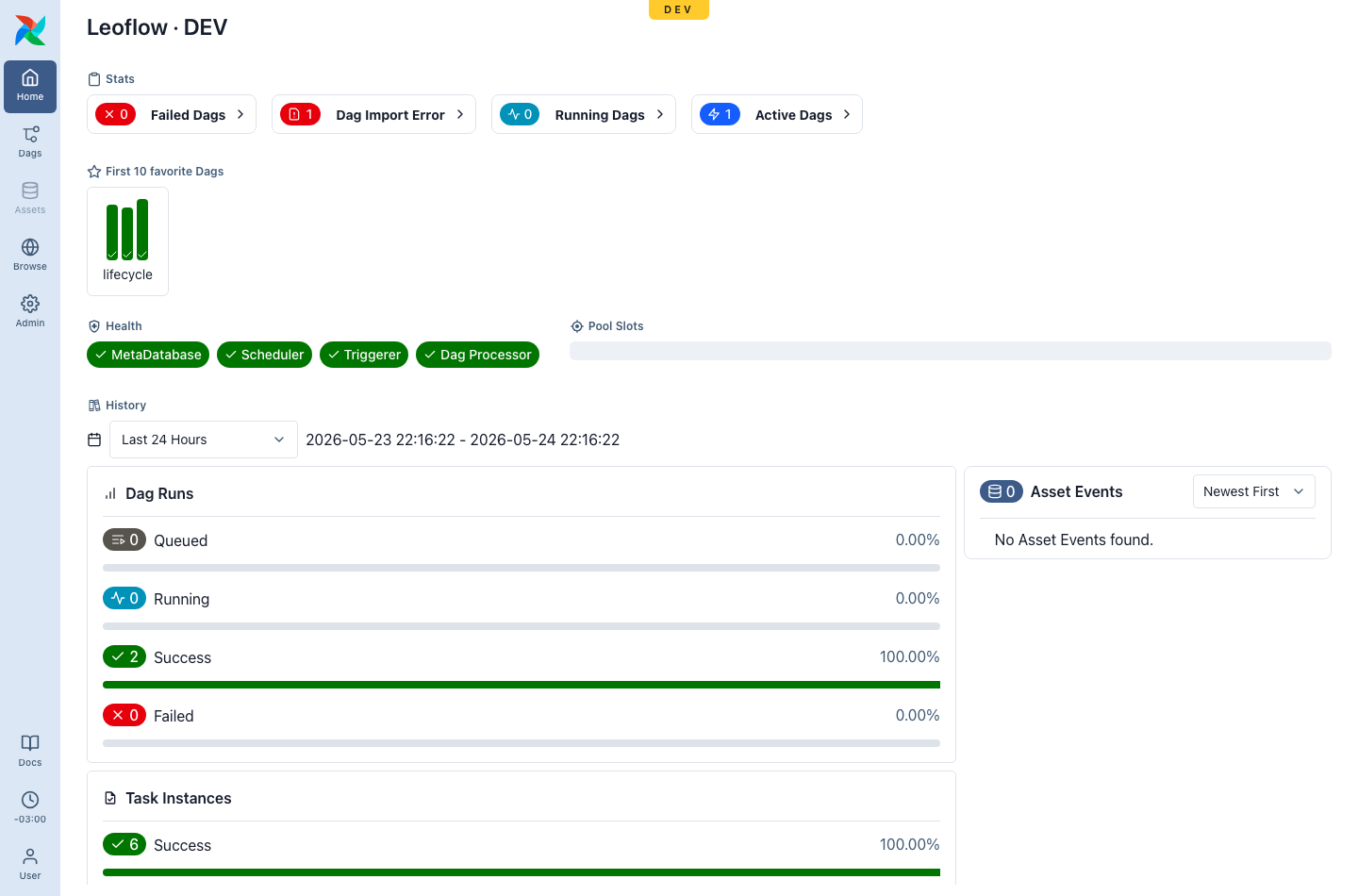
Open it to see the offending file, its bundle, and the full traceback:
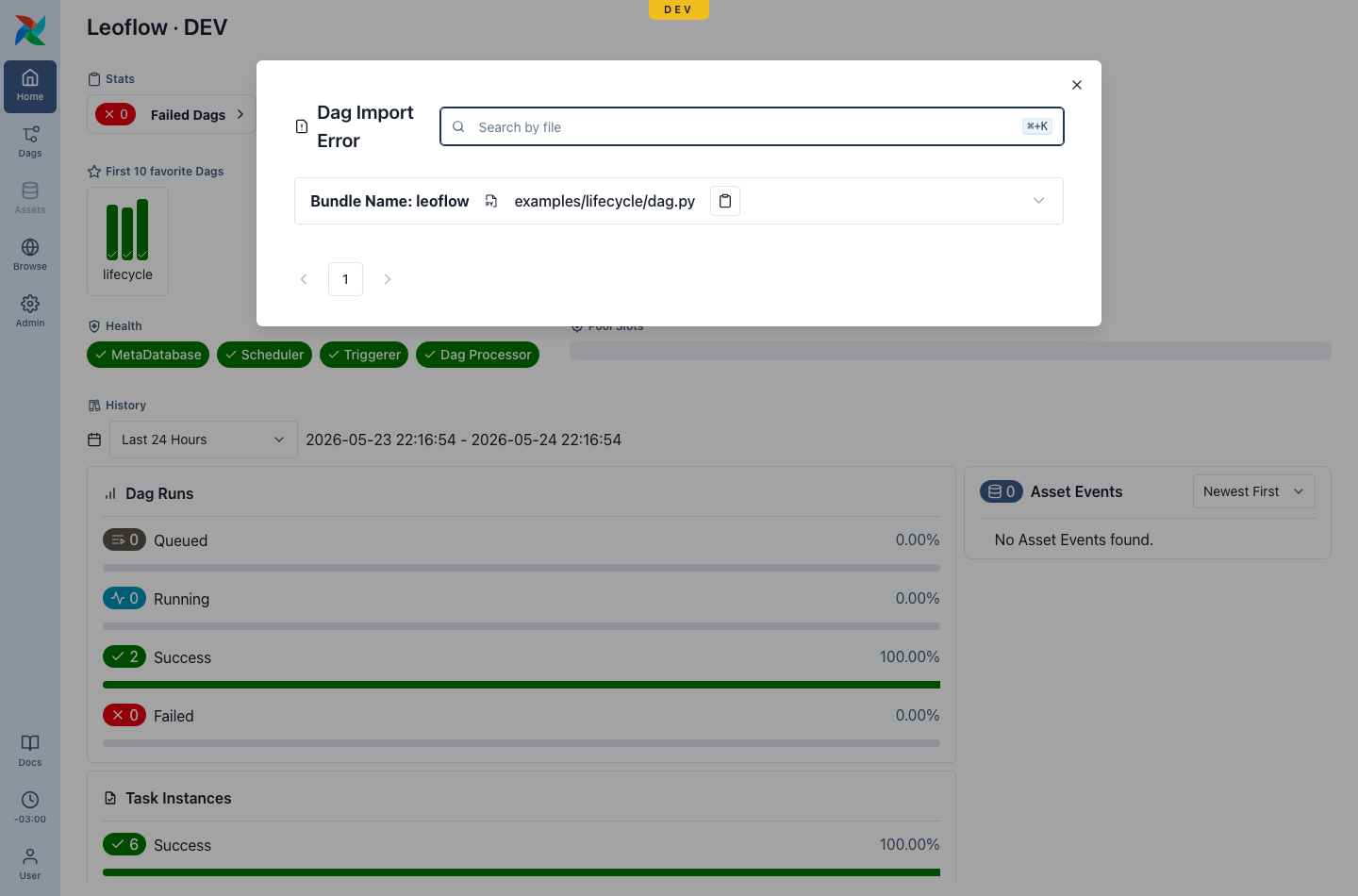
Fix the file and save — the watcher registers the next good version and the banner clears automatically (~2 s). No restart, no manual cleanup.
Lite vs Pro
This banner is driven by a control-plane feed (GET /api/v2/importErrors) and
works in any environment. In Pro you rarely see it: DAGs are
immutable artifacts and a broken DAG fails leoflow compile in CI before it
is ever deployed — CI is the safety net there. In Lite, where you edit live,
the leoflow lite watcher publishes the error so you catch it in the UI, not
only the terminal.
Where to look when something's wrong
- Edited and nothing changed in the UI? Reload the page (structure does not
auto-refresh). If it's still wrong, check the terminal for
✗. - A task is missing from the graph? Make sure it is called inside the DAG, then reload.
Dag Import Erroron the home? Your DAG failed to parse — open the banner (or read the terminal) for the traceback, fix it, and save.- A task ran red? That's a runtime failure, not a parse error — open the run and read the task logs.
Local credentials — GCP, AWS, Azure
leoflow lite's subprocess executor runs each task as a local process under your
user, inheriting your shell environment and $HOME. So your local cloud
credentials just work — no managed Connection needed for local dev:
- GCP —
GOOGLE_APPLICATION_CREDENTIALS, or Application Default Credentials (gcloud auth application-default login→~/.config/gcloud). - AWS —
AWS_ACCESS_KEY_ID/AWS_PROFILEin the env, or~/.aws/credentials. - Azure —
AZURE_*in the env, or the Azure CLI cache (~/.azure).
The provider SDKs find these through their default credential chains, exactly as if you ran the task by hand — so iterating on a DAG that touches your real cloud accounts needs no extra credential wiring locally.
In Pro / cluster mode, task pods are isolated and do not inherit your local env — there you deliver credentials through managed Connections (see Variables & Connections). Same DAG, two credential sources: local env for the Lite loop, managed Connections in production.
Resilience (self-healing)
Lite keeps its own state consistent without manual cleanup:
- Stale state self-heals on boot. If a reused metadata DB still carries DAGs or import errors from a previous run or workspace, on startup Lite reconciles them against your workspace — deregistering DAGs whose files are gone and clearing orphan import errors (fail-safe: if it cannot list the control plane, it removes nothing).
- A DAG's per-DAG venv is reclaimed when the DAG is removed (and re-created if it comes back), so virtualenvs don't pile up on disk.
- Docker wedged? Lite still runs. If Docker is present but unresponsive, Lite
falls back to a Docker-free managed Postgres and the subprocess executor instead
of aborting — or force it with
leoflow lite --postgres managed.